
Squirro Graphite#
Squirro Graphite is a software application for designing, building, and managing Knowledge Organization Systems (KOS) based on Linked Data and Semantic Web standards. Using an intuitive drag-and-drop interface, you can design taxonomies, thesauri, glossaries, name authorities, and enterprise knowledge graphs without requiring deep technical expertise.
Download the official product guides, covering the user interface, data import, the API, SSO setup, and user permissions.
Core Concepts#
The following building blocks make up the Graphite data model. Understanding them helps you design effective knowledge organization systems.
Namespaces and Predicates#
A Namespace is a set of uniquely identified properties that share a common source and root URI. Predicates define either the properties belonging to a Concept (Annotation Properties, which link a Concept to a data value) or the relationships linking any pair of Concepts (Relationship Types, which link one Concept to another Concept).
Graphite provides built-in support for W3C standard ontologies such as SKOS, OWL, and FOAF. You can also create custom Namespaces and Predicates when standard ones do not meet your needs.
Templates#
A Template is a named, reusable selection of Annotation Properties and Relationship Types drawn from one or more Namespaces. Templates define the data entry fields and relationship options that appear when editing a Concept of a given type.
For example, a “Topics” Template might include SKOS properties such as preferred label, alternative label, and definition, together with narrower, broader, and related relationships.
Schemes#
A Scheme is a logical container for a coherent set of Concepts describing a particular domain of knowledge. Schemes adopt one or more Templates and can apply additional business rules, for example cardinality constraints. Different Schemes can be linked together using semantically expressive relationships to form an extended knowledge organization system, also known as an ontology.
Concepts#
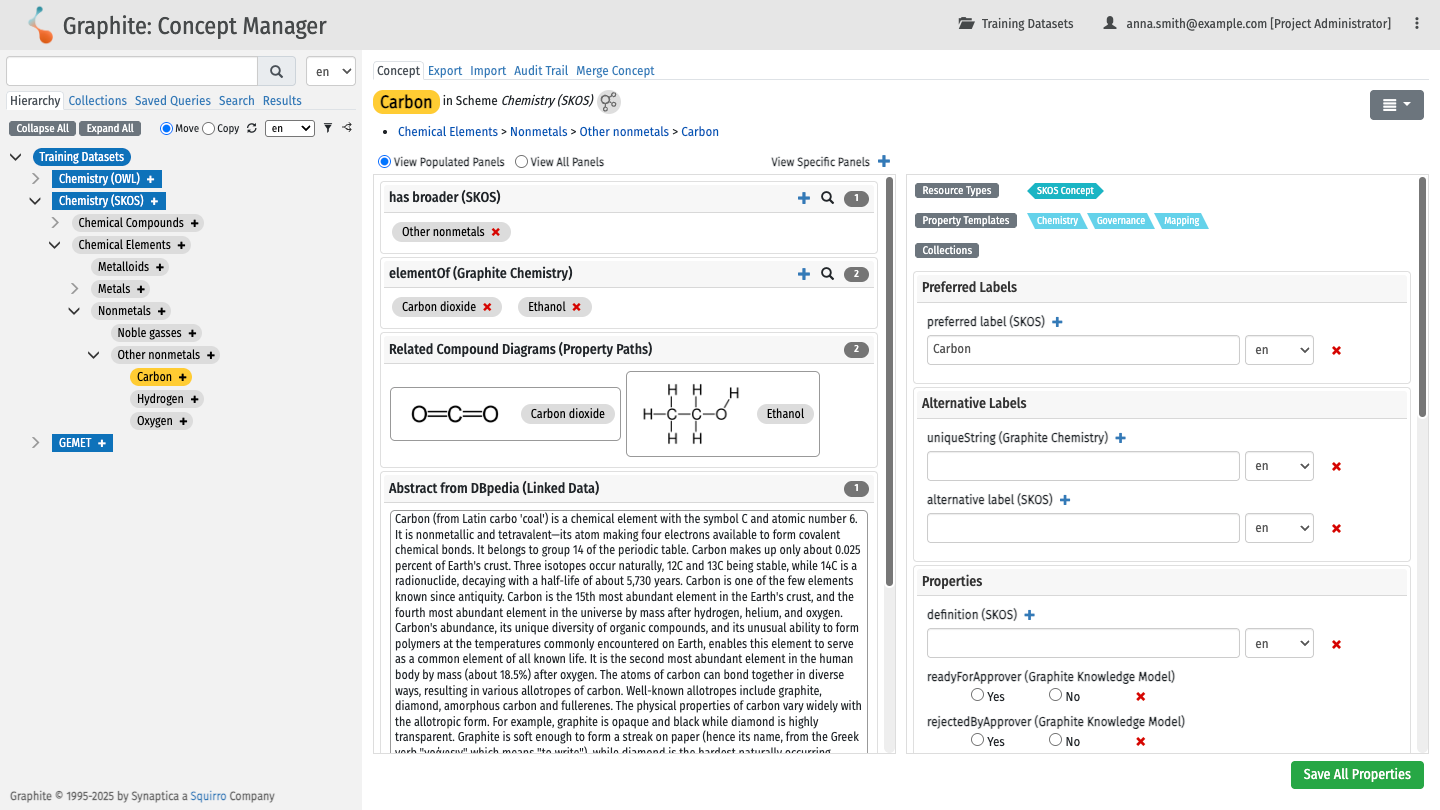
A Concept is an individual resource within a Scheme. Each Concept has a unique URI and a preferred label, and can include multiple properties and relationships. Concepts can represent classes of things (topics, categories) or specific named entities (people, places, organizations).
Projects#
A Project combines one or more Schemes with a set of users and defines access control permissions for each user. Projects provide collaborative editorial workspaces for managing related Schemes.
Users and Permissions#
Access to Projects and Schemes is controlled through user groups. Graphite defines five standard roles, each with a different level of access.
Super Administrator
Full system access. Configures Namespaces, Predicates, Templates, Schemes, Projects, and user groups. Also has all editorial permissions across every Project.
Project Administrator
Manages one or more Projects with full editorial access to all Schemes within those Projects.
Taxonomy Editor
Creates, edits, and deletes Concepts and relationships within assigned Projects. Taxonomy Editor II can also change the approval status of Concepts. Taxonomy Editor I cannot.
Taxonomy Reviewer
Can edit certain properties and view others within a Scheme, but cannot add, delete, or change relationships.
Taxonomy Viewer
Read-only access to assigned Schemes and Concept properties.
Permissions are assigned at the group level and can be scoped to an entire Project, to specific Schemes, or to combinations of both. For detailed configuration guidance, see the Managing User and Group Permissions guide.
Getting Started#
Log In#
Navigate to your Graphite instance URL and select Sign in in the upper-right corner. Enter your username and password to access the system.
If your organization uses single sign-on (SSO), selecting Sign in authenticates you automatically without requiring a password.
If you have forgotten your credentials, select Forgot your username or password? on the sign-in page and enter your username or the email address associated with your account to receive a password reset email. If you do not receive an email, contact your Graphite administrator.
Create Your First Project#
Project Quick Start provides an expedited way to create a Project and Scheme together. It is available to users with Super Administrator or Project Administrator permissions.
After logging in, select Project Quick Start from the project landing page or the Select Project dropdown menu.
Step 1 - Create project
Enter a project name and an optional description, then select Next.
Step 2 - Create scheme
Enter a Scheme label and an optional description, then select Next.
Step 3 - Assign user group
Add one or more permission groups to the Project. The group of the currently logged-in user is selected by default. Select Finish to create the Project and Scheme.
The new Scheme includes the following SKOS properties and relationships by default:
Preferred label (
skos:prefLabel).Alternative label (
skos:altLabel).Definition (
skos:definition).Has broader (
skos:broader).Has narrower (
skos:narrower).Has related (
skos:related).
Note
You can change any settings configured during Project Quick Start later in the administrative areas of the system.
Create Your First Concept#
With a Project and Scheme selected, open the Concept Manager from the main menu.
To add a Concept:
Select the + button next to the Scheme or a parent Concept in the hierarchy panel.
Enter the preferred label for the new Concept in the New Concept panel.
Complete the available property fields.
To create relationships between Concepts, drag a Concept from the discovery panel and drop it onto the appropriate relationship container in the workspace. Valid drop targets are highlighted in green.
Next Steps#
With your first Project, Scheme, and Concept in place, you can continue building your knowledge organization system.
Expand your Scheme by adding more Concepts and building out the hierarchy using drag-and-drop.
Import existing vocabulary data into Graphite using the Import Guide.
Invite collaborators by setting up user groups and assigning permissions.
Explore advanced features such as batch editing, saved queries, and knowledge graph visualization in the User Guide.
The official PDF guides covering all of these topics are available on the Downloads page.
Squirro Integrations#
Maintaining and growing a taxonomy manually is time-consuming and does not scale well with large document corpora. Traditional NLP-based tagging relies on string matching and does not account for the semantic meaning encoded in taxonomy definitions and hierarchies. The pipelets described on this page address both limitations by using large language models to extract knowledge directly from documents, guided by the structure and semantics of an existing taxonomy.
Squirro Classifier
Graphite integrates with Squirro Classifier to provide access to taxonomies and controlled vocabularies for classification. Classifier categories linked to Graphite concepts are called Linked Categories and support Entity Linking by associating detected entities with their corresponding Graphite concepts.
Concept Extraction
The LLM Concept Extraction pipelet proposes new narrower concepts for existing taxonomy terms, extracted from your document corpus. Candidate concepts come with labels, definitions, and synonyms, and are written to a separate Graphite scheme for human review.
Relationship Extraction
The LLM Relationship Extraction pipelet proposes new relationships between existing concepts, based on evidence found in your document corpus. Candidate relationships follow a set of predicates you define.
Semantic Tagger
The LLM Semantic Tagger pipelet annotates documents with concepts from an existing Graphite taxonomy. Unlike string-matching approaches, it leverages taxonomy semantics such as concept definitions and hierarchies to identify relevant concepts.